




Multi-Genre
The REESE Plugin
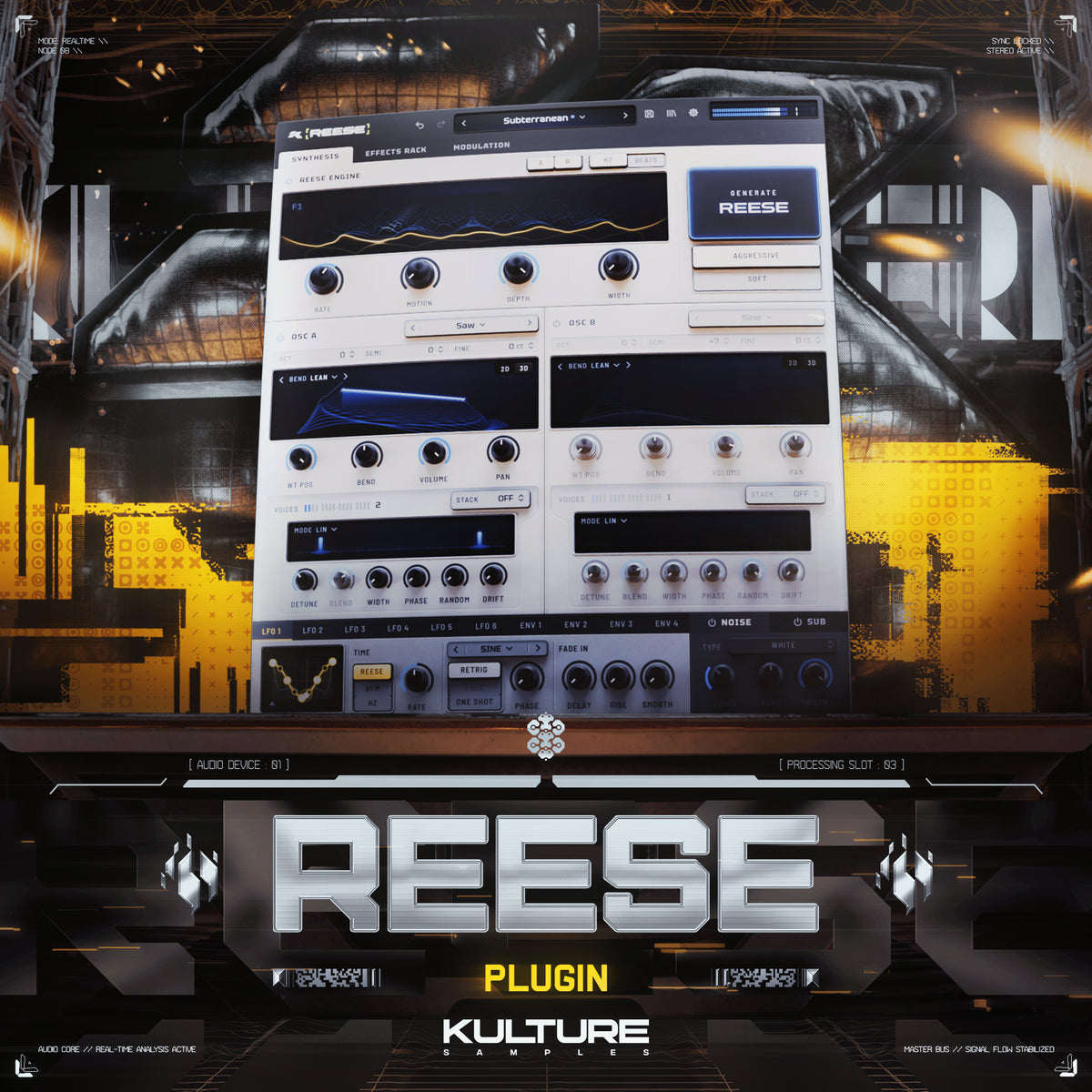
The most powerful Reese Synth Plugin, powered by the 'Reese Engine' that follows the speed of your reese, with unlimited modulation & FX Processing.
Reeses create a Phasing Wobble when they speed up, which is the main characteristic of the Reese. The 'Reese Engine' accurately calculates the speed, and allows you to modulate ANYTHING in the plugin through the Reese Engine.
Features 2 Oscillators, 1 Noise Oscillator, 6 LFOs, 4 Envelopes, Velocity & Note Tracking and 15 FX Modules for you to add & rearrange however you like. Supercharged with a 'GENERATE REESE' button that instantly builds a powerful Patch for you.
Some of the top features of this plugin:
- Generate Reese: Endless Liquid & Aggressive Reeses
- Reese Engine: Rate, Motion, Depth & Width
- 2 Oscillators w/ Deep Detune
- 6 LFOs
- Synthesis, Effects Rack & Modulation Pages
- Full Preset Library
- Genres: Neuro, Jump-Up, Dancefloor, Liquid, DnB & more
The ultimate
reese plugin
Generate professional reeses in seconds

- 01Hit generate reeseNew synthesis, effects & modulation in one click.
- 02Reese engine calculatesThe accurate wobble speed of your reese.
- 03Modulation & modular FX chainUnlimited modulation control.
- Reese like never beforeProfessional reeses, every single time.
- Crunchwrap0:05
- Downfall0:05
- Gater0:05
- Incision0:05
- Max Grit0:05
- Smooth Overtones0:05
- Angular0:05
- Generation 10:05
- Generation 20:05
- Generation 30:05
Specs
- MacAU and VST3macOS 11+, Intel & Apple Silicon
- WindowsVST3Windows 10+, 64‑bit
- Version1.0Out now
- Free updatesEvery future version
Works in
 FL Studio
 Ableton Live
 Logic Pro
 Cubase
 Bitwig Studio
 Studio One
 Reaper
 Reason 12+
 Nuendo
 GarageBand
FL Studio, Ableton Live, Logic Pro, Cubase, Bitwig Studio, Studio One, Reaper, Reason 12+, Nuendo, GarageBand.
Not supported: Pro Tools (needs AAX).
At a glance
The most intelligent reese plugin online
REESE is a complete synth, built around one sound: the reese. Generate one in a click, control its speed, then run it through a modular FX chain and make any part of it move.
- 1The REESE engineThe speed of your reese, live.
- 2Generate random reeseA professional reese in one click, AGGRESSIVE or SOFT.
- 3Endless synthesisTwo wavetable oscillators with unison, 6 LFOs, 4 envelopes, a NOISE layer and a SUB.
- 4Effects rack15 FX modules in one modular rack.
- 5ModulationThe modulation matrix: make any knob move.
REESE allows for next-level control over your reeses.

The REESE engine
Control the speed of every reese
A reese is two or more detuned voices, drifting in and out of phase. That phasing is what makes it move, and the REESE engine calculates it for you: you see it live, right as you hear it.
- AShape the speed & motion with 4 knobs
- BSet any LFO to the REESE engine speed
- CModulate ANY knob, synced with your reese’s wobble speed
Unlock a new level of reese synthesis, and modulate like never before.

Generate reese
Professional reeses, every single time
Hit GENERATE REESE and REESE randomizes the synthesis, the effects and the modulation, based on intelligent rules. The result: a professional reese, every single time.
- ANew synthesis, effects and modulation in one click
- BIntelligent rules keep every reese professional
- CAGGRESSIVE for Jump Up & Neuro reeses, SOFT for Liquid
Speed up your workflow like never before, and get instant inspiration.
Effects rack
Control every FX module
Add a modular FX chain to your reese: pick from 15 FX modules, drag them into any order and save the whole rack as a preset. The effects can make or break a reese, so we put special care into every single module.
- 01Equalizer
- 02M/S Equalizer
- 03Distortion
- 04Limiter
- 05Reverb
- 06Convolver
- 07Multiband
- 08Filters
- 09Phase Stack
- 10Comb
- 11Volume Envelope
- 12Delay
- 13Chorus
- 14Frequency Shifter
- 15Compressor


Shape the tone of your reese with any EQ band you want, anywhere: bells, shelves, cuts and notches. Pick the PHASE mode, and the view widens from ±6 to ±12 dB by itself when you boost.
EQ the middle and the sides of your reese separately: clean up the sides and keep the middle fat and heavy. WIDTH sets how wide it gets.
Add drive, grit and power to any reese, from a warm SOFT CLIP to full-on dirty. Filter it PRE or POST.
Keep your reese loud and under control, with the gain reduction right on the screen. THRESHOLD, OUT CEILING, ATTACK, RELEASE, KNEE and SOFT CLIP, with AUTO and TRUE peak.
Put your reese in a ROOM or on a PLATE, and let DUCK pull the tail down while it plays, so it never smears your bass. SIZE, DECAY, PRE-DELAY, BLOOM, FOCUS and TONE.
Put your reese in real spaces, from impulse responses. WET, STEREO, TONE and SPEED.
Compress the LOW, MID and HIGH of your reese separately, for a tight, even and powerful low end. DEPTH and TIME set how hard it works.
Carve movement into your reese with a PHASER, COMB, NOTCH, LOW PASS, HIGH PASS or BAND filter, with slopes up to 30 dB. CUTOFF, RESO and DRIVE.
Stack phase shifts for that smeared, liquid neuro movement. AMOUNT, FREQ and PINCH.
Give your reese a hollow, metallic edge with a comb filter. FREQ, AMOUNT, its polarity and STEREO.
Draw the volume of your reese over time, like CLEAN PUMP, even per band. Pick the RATE, the GRID and the DEPTH.
Throw your reese around with a CLASSIC or PING-PONG delay, synced to your track, and let DUCK keep the repeats out of the way. FEEDBACK, DIFFUSE, DRIVE and REPEAT TONE.
Make your reese wider and thicker with CLASSIC, ENSEMBLE or DIMENSION, with 2, 4 or 6 voices. RATE, DEPTH, WIDTH, FEEDBACK and DELAY.
Add metallic, detuned movement to your reese. SHIFT, FEEDBACK, SPREAD, DRIFT and SIDEBAND.
Glue your reese together and make it punch, with the curve and the gain reduction on the screen. THRESHOLD, RATIO, ATTACK, RELEASE and MAKEUP.
FX chain controls
- ADD MODULE to the rack
- Drag to change the order
- Save the whole rack as a preset
- BYPASS the rack or any module
- Remove a module

Modulation
Modulate every part of your reese
Every LFO, envelope, velocity and key can go to anything in the plugin, with up to 64 routings in the matrix. Set an LFO’s TIME to REESE and it follows the speed of your reese.
- A6 LFOs and 4 envelopes, plus VEL and KEY
- BDraw your own LFO shape, or pick one like TRIANGLE
- CRETRIG, FREE or ONE SHOT, with the PHASE and SMOOTH
Every routing has its own range, curve and amount, so you decide exactly how far it moves.
Navigate the plugin
Explore every feature of REESE
Top bar
Pages
Engine
Oscillators
Bottom row
Top bar
Rack
Modules
Filters
Distortion
Multiband
Top bar
Sources
LFO
Matrix
Top bar
Library
Settings
General
REESESynthesis


Green: the plugin’s own buttons, click one to open that page. Red dots: the features, click one to zoom in.
Frequently asked questions
It calculates the speed of your reese: the phasing of its detuned voices. Set any LFO to the REESE engine speed and it follows it exactly, so you can modulate any knob in sync with your reese’s wobble.
It randomizes the synthesis, the effects and the modulation, based on intelligent rules, so every reese it makes sounds professional. AGGRESSIVE for Jump Up and Neuro reeses, SOFT for Liquid.
Yes. Load it as an instrument and play it: generate a new reese, or build one from scratch with two wavetable oscillators.
Yes: synth presets, rack presets for the whole effects rack, presets for every FX module, and presets for the wavetables.
Yes. Every reese you make is 100% royalty-free, so you can use them in commercial releases.
Windows: VST3. Mac: AU and VST3. It works in every major DAW, including FL Studio, Ableton Live, Logic Pro, Cubase and Bitwig. Pro Tools is not supported, because it needs AAX.
Mac: macOS 11 Big Sur and up, on Intel and Apple Silicon (AU and VST3). Windows: Windows 10 and up, 64-bit (VST3). It runs inside all major DAWs.
After ordering you get instant access to the installer. Run it, open REESE in your DAW and activate it with your license key.
In your library: log in with the email you ordered with, open Plugins and click Generate.
Almost always, you’re logged in with a different email than the one you ordered with. Every email is its own account, and your key is only on the account you ordered with. Log out of your library and log in again with that email. Just ordered? Your key can take a minute to show up. Give it a moment and refresh. Still nothing? Get in touch with your order number and we’ll sort it out.
Open the plugin, click ACTIVATE and paste your license key. This needs an internet connection once. One activation covers every DAW on that computer.
Yes. On the old computer open Settings, click License and deactivate it. Then activate on the new one with the same key.
Yes, you can re-download the plugin anytime.
Yes, for free. Whenever an update is ready, we send you the new installer.
Run the new installer we send you. It keeps your presets. Restart your DAW afterwards so it loads the new version.
You’re covered by our 3-day money-back guarantee. Get in touch through our contact page and we’ll sort it out.
Email us at shop@kulturesamples.com or reach us through our contact page.
Reviews
What people think about this plugin
Real reviews from producers who use it. Already making reeses with it? Leave yours below.