


Multi-Genre
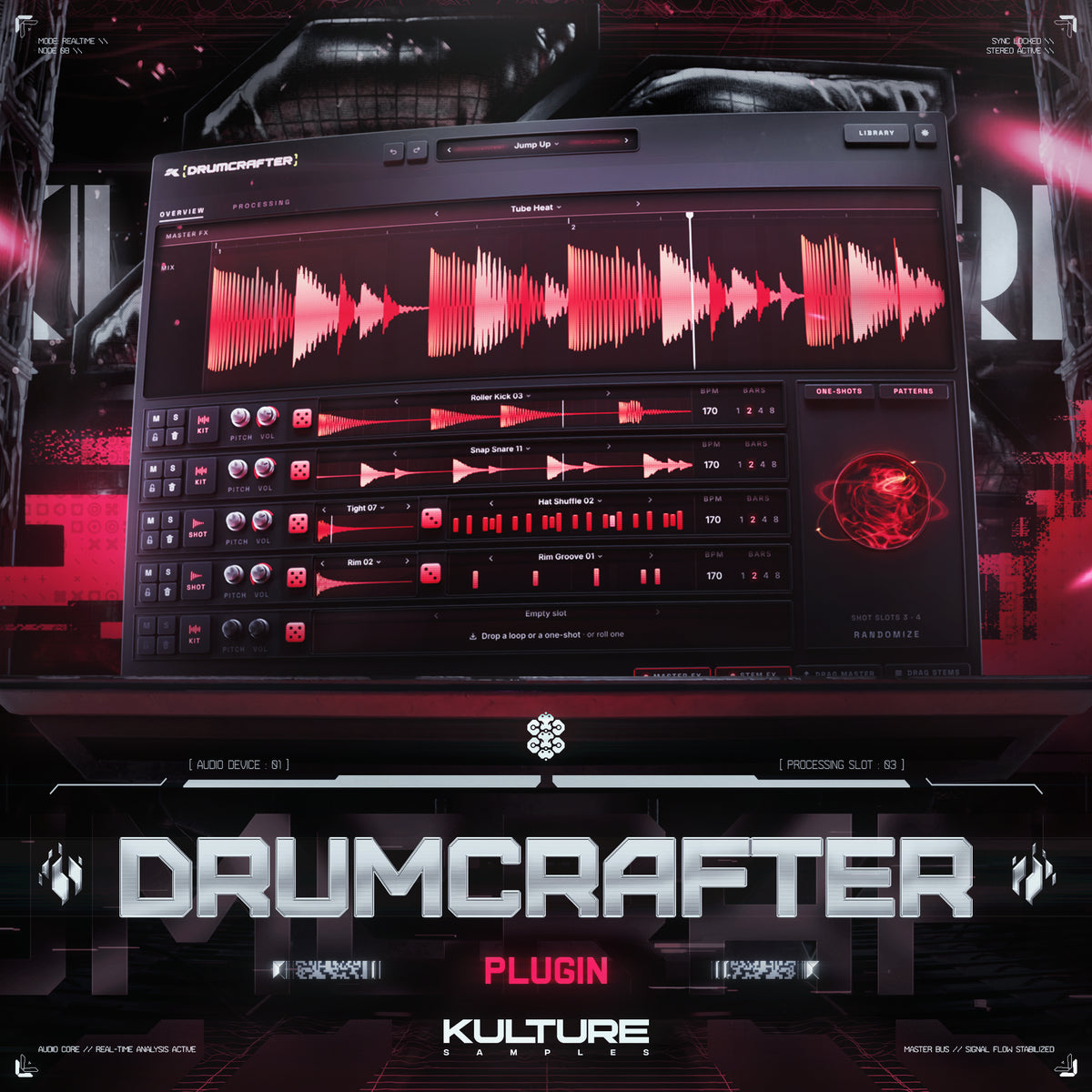
The DrumCrafter Plugin
Instantly generate Insane Drum & Bass Drum Loops through randomizing & FX Processing, supercharged with our library of 5000+ Drums.
Get access to the most powerful Plugin for Neuro, Jumpup, Drum & Bass, UKG, Liquid & Dancefloor Drums. Our collection of 5000+ Drum Loops & Oneshots allows for randomization like never before.
Process every Stem & Loop with 6 FX Modules, and rearrange any Kit into a new variation. Instantly switch between Kit & Oneshot mode, and use MIDI to draw new Drum Loops in seconds.
Some of the top features of this plugin:
- Endless Drum Loops From Our Drum Library
- Randomize Every Drum Layer
- Drum Layers: Kicks, Claps, Hats, Percs & more
- Master FX: Glue + Clip
- Drag Out Master or Stems
- Genres: Dancefloor, Jump-Up, Liquid, Neuro, UKG, DnB & more
The ultimate Drum & Bass
drum plugin
Randomly build infinite Drum & Bass drum loops

- 01Pick a genreDrum & Bass, Neuro, Jump Up, Liquid or Dancefloor.
- 02Hit random5,000+ drum samples included.
- 03Process every stemMaster FX and stem FX, with presets.
- Drag it into your DAWThe master, or every slot as a stem.
Specs
- MacAU and VST3macOS 11+, Intel & Apple Silicon
- WindowsVST3Windows 10+, 64‑bit
- Version1.0Out now
- Free updatesEvery future version
Works in
 FL Studio
 Ableton Live
 Logic Pro
 Cubase
 Bitwig Studio
 Studio One
 Reaper
 Reason 12+
 Nuendo
 GarageBand
FL Studio, Ableton Live, Logic Pro, Cubase, Bitwig Studio, Studio One, Reaper, Reason 12+, Nuendo, GarageBand.
Not supported: Pro Tools (needs AAX).
Genres
Generate drum loops in any genre of Drum & Bass
DrumCrafter takes the drum kits and one-shots we’ve released over the years and randomizes them within the borders of the genre you pick. Load 5 slots with drum kits or drum one-shots combined with MIDI, and generate infinite combinations.
Drum & Bass
- Loop 10:05
- Loop 20:05
- Loop 30:05
- Loop 40:05
- Loop 50:05
Neuro
- Loop 10:05
- Loop 20:05
- Loop 30:05
- Loop 40:05
- Loop 50:05
Jump Up
- Loop 10:05
- Loop 20:05
- Loop 30:05
- Loop 40:05
- Loop 50:05
Liquid
- Loop 10:05
- Loop 20:05
- Loop 30:05
- Loop 40:05
- Loop 50:05
Dancefloor
- Loop 10:05
- Loop 20:05
- Loop 30:05
- Loop 40:05
- Loop 50:05


Drum & Bass
The all-rounder. Rolling Drum & Bass drums from our kits: punchy kicks, snappy snares and hats that keep everything moving.
- AKicks, snares, rides, hats & percs
- BClassic, rolling Drum & Bass grooves
- CLoops or one-shots with MIDI on every slot
Neuro
Dark, tight and heavy. Drums from our Neuro kits, made to cut through big, distorted basses.
- AKicks, snares, top loops, rides & percs
- BHard-hitting drums for dark, technical neuro
- CTop loops for that busy neuro energy
Jump Up
Bouncy and loud. Drums from our Jump Up kits, with claps instead of snares for that big jump up bounce.
- AKicks, claps, rides, hats & percs
- BBig, bouncy jump up grooves
- CClaps instead of snares, made for the bounce
Liquid
Smooth and rolling. Drums from our Liquid kits, with top loops and rides that keep your track flowing.
- AKicks, snares, top loops, rides & percs
- BSmooth, rolling liquid grooves
- CTop loops & rides that keep it flowing
Dancefloor
Big, clean and made for the club. Drums from our Dancefloor kits, punchy and loud enough for any big system.
- AKicks, snares, hats, rides & percs
- BClean, punchy dancefloor grooves
- CBuilt to hit hard in the club


Kit or shot
Easily switch a slot between drum loops & one-shots + MIDI
Every slot is one stem of your drums: a kick, a snare, a ride and so on. Flip it to KIT for a drum loop, or to SHOT for a drum one-shot played by a MIDI pattern.
- AKIT: a drum loop from our kits. The dice rolls a new one from the same folder
- BSHOT: a drum one-shot played by a MIDI pattern. Roll the one-shot, the pattern, or both
- CBPM and BARS (1, 2, 4 or 8) keep every slot in time
Mix them in one kit: drum loops for the hats and rides, one-shots with MIDI for the kick and the snare.
Edit any slot
Rearrange every drum loop and build your own MIDI
Every slot has a detailed sampler that lets you chop up a drum loop into new variations, or a MIDI piano roll to draw your own MIDI for drum one-shots.


Chop a drum loop into new loops
Simply take a slice of a drum loop and drag it anywhere you want. Or hit the dice to slice it up randomly, but contained within patterns that work within the genre.
- AClick a Sample Slot to open the Detailed Sample View
- BSlice it on a 1/4, 1/8, 1/16 or 1/32 grid
- CREVERSE, REPEAT or MUTE any slice, RESET puts it all back
Draw your own MIDI for drum one-shots
A one-shot played by its MIDI: build the NOTES and the PITCH yourself, or step through the patterns and randomize a new MIDI pattern.
- ADraw the NOTES and the PITCH yourself
- BStep through the MIDI patterns with the arrows
- CThe dice rolls a new one-shot or a new pattern
Processing
Control every FX module
Add a modular FX chain to any of the drum stems, as well as the master. Processing can make or break your drum loops, so we put special care into this section of the plugin.
- 01EQ
- 02Transient
- 03Distortion
- 04Clip
- 05Stereo
- 06Sidechain


Add any EQ point you want, anywhere, including mid/side and stereo processing: highpasses, lowpasses, bell curves & much more. Drag the points right over the spectrum of your drums, or type in the exact FREQ, GAIN and Q.
Instantly improve the transients of your drums with an intuitive, all-in-one transient shaper. Shape the ATTACK, SUSTAIN and SPEED of the whole loop.
Waveshape your drum layers to add drive and power to any drum loop. Pick a mode like WARM, turn up the DRIVE and shape it with TONE, BIAS, PUNCH and LOW, with the loop drawn right next to it.
Easily clip any drum loop with an easy-to-read oscilloscope that lets you shave off the transients accurately, without destroying the drums. Push the GAIN into the curve and set the CEILING and SOFT.
Add width to specific frequency areas and excite them at the same time through side saturation. WIDTH for the LOW, a BAND or the HIGH end, plus PUNCH and EXCITE.
Instantly sidechain any sample slot to another, like the hats and percs to the pattern of the kick. Set the AMOUNT, SPEED, HOLD and SHAPE yourself.
FX chain controls
- + ADD MODULE
- Drag to change the order
- Bypass any module
- Duplicate a module
- Delete a module
Navigate the plugin
Explore every feature of DrumCrafter
Top bar
Overview
Slots
Randomize
Bottom bar
Top bar
Stem
Slices
Top bar
One-shot
MIDI
Top bar
Stems
Chain
Module
Top bar
Library
Top bar
Settings
Playback
DrumCrafterOverview


Blue: the plugin’s own buttons, click one to open that page. Red dots: the features, click one to zoom in.
Frequently asked questions
Over 5,000 drum samples: the drum kits and one-shots we’ve released at Kulture over the years, in Drum & Bass, Neuro, Jump Up, Liquid and Dancefloor.
Yes. Drop drum loops or one-shots into the slots, in any tempo: they lock to your DAW and play on top of each other.
Yes. Draw your own MIDI for a one-shot, or roll a pattern.
Yes. Every loop you make is 100% royalty-free, so you can use them in commercial releases.
Windows: VST3. Mac: AU and VST3. It works in every major DAW, including FL Studio, Ableton Live, Logic Pro, Cubase and Bitwig. Pro Tools is not supported, because it needs AAX.
Mac: macOS 11 Big Sur and up, on Intel and Apple Silicon (AU and VST3). Windows: Windows 10 and up, 64-bit (VST3). It runs inside all major DAWs.
After ordering you get instant access to the installer. Run it, open DrumCrafter in your DAW and activate it with your license key.
In your library: log in with the email you ordered with, open Plugins and click Generate.
Almost always, you’re logged in with a different email than the one you ordered with. Every email is its own account, and your key is only on the account you ordered with. Log out of your library and log in again with that email. Just ordered? Your key can take a minute to show up. Give it a moment and refresh. Still nothing? Get in touch with your order number and we’ll sort it out.
Open the plugin, click ACTIVATE and paste your license key. This needs an internet connection once. One activation covers every DAW on that computer.
Yes. On the old computer open Settings, click License and deactivate it. Then activate on the new one with the same key.
Yes, you can re-download the plugin anytime.
Yes, for free. Whenever an update is ready, we send you the new installer.
Run the new installer we send you. It keeps your presets. Restart your DAW afterwards so it loads the new version.
You’re covered by our 3-day money-back guarantee. Get in touch through our contact page and we’ll sort it out.
Email us at shop@kulturesamples.com or reach us through our contact page.
Reviews
What people think about this plugin
Real reviews from producers who use it. Already crafting drums with it? Leave yours below.